
WinOLS 5 Software License
Code: DJ-WINOLS-OLS505
EVC ECU map editing software. OLS505 licence for one workstation; optional plugins sold separately. Numerical, 2D and 3D views, file comparison and project versions.
- Delivery Software, no physical shipping
- Category WinOLS 5 Software
- Questions WhatsApp · Email us

Description
Overview
WinOLS 5 from EVC electronic helps technicians locate, inspect and edit ECU calibration maps. Compare related files, review map data and keep your work organised in projects.
 WinOLS 5 software from EVC electronic.
- Search for maps and inspect data as hex or decimal values, a 2D graph or a 3D map.
- Keep multiple modified versions alongside each original, with comments and vehicle or customer information in the project.
- Find saved work in a project list that supports searching, filtering and sorting.
- Import or export binary data and Intel or Motorola hex files; use compatible checksum, import/export and map plugins when the job needs them.
- Choose an English or German interface.
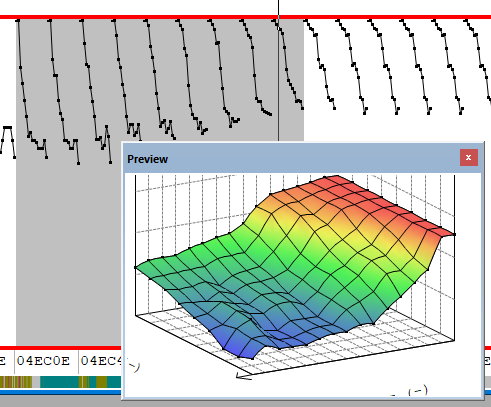 A map preview helps you examine the shape of calibration data.
Licensing
OLS505 is a software licence for one workstation. Activate it through the WinOLS Updates + Activation workflow. For activation on an existing installation, enter your EVC customer number in the checkout field "EVC customer number".
Additional workstation licences are for computers belonging to the same company and use by that company's employees. EVC does not permit the sale, rental or transfer of licences or their customer-number and password credentials.
This purchase does not include a USB dongle or an ECU programming interface. ECU reading and writing need separate equipment suitable for the vehicle and controller.
Premium features
Premium Features provides an annual entitlement to newly introduced WinOLS functions. The base software remains usable without an annual renewal, and EVC continues to provide bug fixes and smaller improvements.
A Premium Feature released after your covered period needs the relevant renewed entitlement. For example, the Slices map display is a premium option: it aligns map lines at the same height to help compare their shapes.
Compatibility
- Supported operating systems are Windows 10 x64, Windows 11 x64 and Windows 11 ARM.
- EVC lists UCM100, BDM100, BSL100 and OLS300 hardware integration for non-ARM systems. Megaprommer MP2240P and OLS16 are no longer supported.
- WinOLS 4 and WinOLS 5 can be installed side by side. The same workstation licence covers both installations on that computer.
- Projects created or saved with WinOLS 5 cannot be opened in WinOLS 4 because the newer project format can hold additional information.
Plugins
Checksum, import/export and map plugins are licensed separately. Before ordering, check the plugin against the ECU family, file format and connected tool. Browse our WinOLS plugins for available modules.
Plugins require a licensed WinOLS 5 installation. Enter your EVC customer number at checkout for activation.
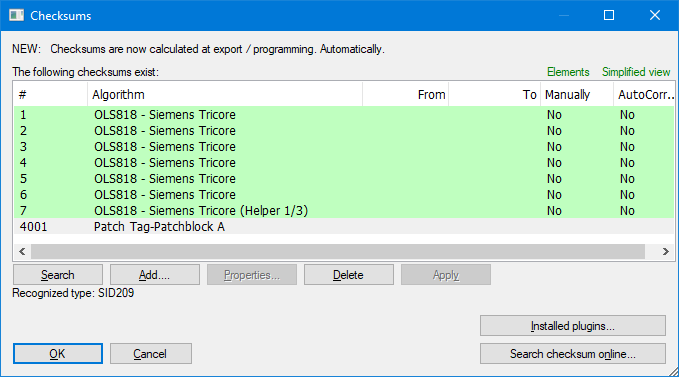 Example checksum window; the optional modules shown are supplied separately.