
BitBox – SsangYong Delphi Diesel
Code: DJ-BITBOX-9
BitBox activation for SsangYong Delphi Diesel. Check the ECU, software version and connection requirements against the official compatibility list.
- Delivery Software, no physical shipping
- Category BitBox Software Module
- Questions WhatsApp · Email us

Description
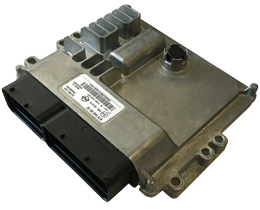
Module SsangYong Delphi Diesel


FID: 32, 33, 34, 87
OBD reading and writing for Delphi controllers used in diesel SsangYong vehicles.
SsangYong Delphi DCM6.2AP (FID: 32)
Processor: NXP SPC5673. Internal memory: 3Mb.
Read and write the calibration area over CAN with CHK calculation. Recovery is available regardless of ECU state.
Supported vehicles:
SsangYong Tivoli/XLV D16DTF
SsangYong Rodius/Stavic II D22DTR
SsangYong Korando C/New Actyon D22DTF
SsangYong Rexton G4 D22DTR
SsangYong Delphi DCM6.2AP-6D (FID: 87)
Processor: NXP SPC5674. Internal memory: 4Mb.
Read and write the calibration area over CAN with CHK calculation. Recovery is available regardless of ECU state.
Supported vehicles:
SsangYong Rexton G4 D22DTR-SCR
SsangYong Delphi DCM3.7AP (FID: 33)
Processor: Renesas SH72513. Internal memory: 2Mb.
Read FullFlash and write the calibration area over CAN, including CHK calculation.
Supported vehicles:
SsangYong Actyon Sports D20DTR
SsangYong Korando C/New Actyon D20DTF
SsangYong Rexton D20DTR
SsangYong Rodius D20DTR
SsangYong Stavic II D20DTR
SsangYong Delphi DCM3.2AP (FID: 35)
Hardware: Motorola MPC563 plus AM29BDD160GB external flash; total addressable memory, 2.5Mb.
Read FullFlash and write over K-line with CHK calculation.
Supported vehicles:
SsangYong Actyon D20DT Euro4
SsangYong Actyon Sports D20DT Euro4
SsangYong Kyron D20DT Euro4
SsangYong Kyron D27DT Euro4
SsangYong Rexton D20DT Euro4
SsangYong Rexton D27DT Euro4
SsangYong Rodius D27DT Euro4
SsangYong Delphi DCM3.1 (FID: 34)
Processor: Motorola MPC555. Internal memory: 448Kb.
K-line functions include FullFlash reading and calibration writing with CHK calculation.
Supported vehicles:
SsangYong Actyon D20DT Euro3
SsangYong Actyon Sports D20DT Euro3
SsangYong Kyron D20DT Euro3
SsangYong Kyron D27DT Euro3
SsangYong Rodius D27DT Euro3
Tata Safari 3.0 DiCOR
Tata Xenon 3.0 DiCOR
Software activation requires a BitSoftware USB dongle. Enter your existing dongle serial number in the serial number field at checkout.
Technical source: BitBox official module documentation.
More in BitBox Software Module
View all-
 BitBox – VAG Continental Simos 8 [SM2/SM3 ONLY]DJ-BITBOX-90
$187.00
BitBox – VAG Continental Simos 8 [SM2/SM3 ONLY]DJ-BITBOX-90
$187.00
-
 BitBox – China FullDJ-BITBOX-93
$793.00
BitBox – China FullDJ-BITBOX-93
$793.00
-
 BitBox – China LinControl PetrolDJ-BITBOX-94
$117.00
BitBox – China LinControl PetrolDJ-BITBOX-94
$117.00
-
 BitBox – Honda Moto Keihin CANDJ-BITBOX-95
$233.00
BitBox – Honda Moto Keihin CANDJ-BITBOX-95
$233.00
-
 BitBox – China Trucks ContinentalDJ-BITBOX-96
$350.00
BitBox – China Trucks ContinentalDJ-BITBOX-96
$350.00
-
 BitBox – Ford Bosch MG1/MD1 Gen2DJ-BITBOX-97
$467.00
BitBox – Ford Bosch MG1/MD1 Gen2DJ-BITBOX-97
$467.00